
Usage limits
Chat, voice calls and meetings without cameras have no limit. Two things do, because they cost the most to run: video in calls and meetings, and storage for files and recordings. Admins can see both under Workspace settings → Billing → Usage.
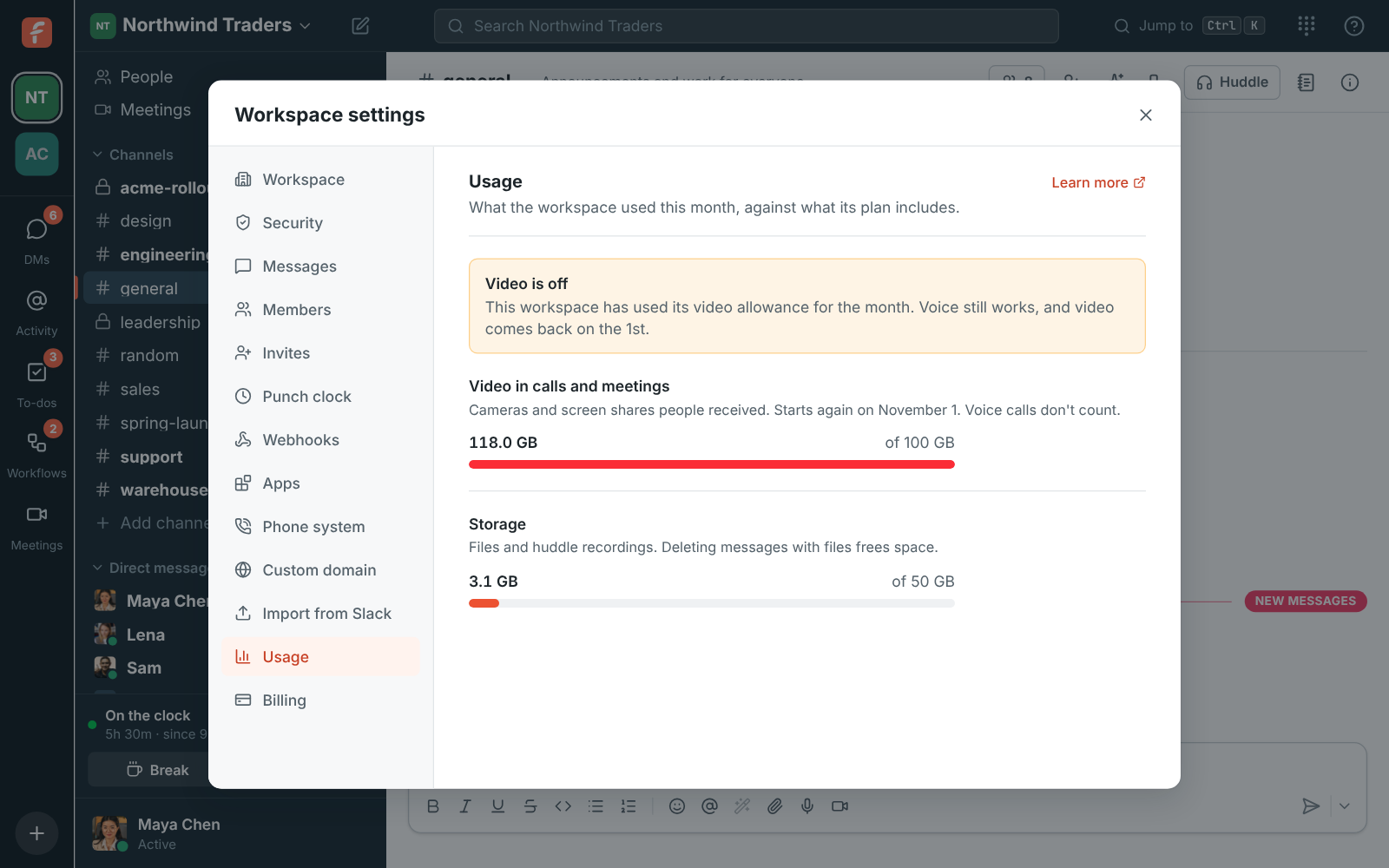
| What | Included | Starts again |
|---|---|---|
| Video in calls and meetings | 100 GB a month | On the 1st of each month |
| Storage (files, recordings) | 50 GB | When files are deleted |
For now every workspace has these limits whatever its plan; the per-person allowances on Plan limits come later. Enterprise workspaces can have their own limits. Contact us if yours needs more.
What counts as video
Section titled “What counts as video”Video is the cameras and screen shares people receive. If three people have their cameras on in a call with five people, each of the five receives up to three streams. As a guide, 100 GB is about 150 hours of one camera received. A one-on-one video call uses two of those hours for every hour it runs, so 100 GB covers about 75 hours of one-on-one video calls a month.
Voice doesn’t count. Neither does your own camera preview.
When the video allowance runs out
Section titled “When the video allowance runs out”- Cameras and screen sharing turn off in every call and meeting in the workspace. Anyone sharing sees This workspace has used its video allowance for the month.
- The Turn on camera and Share screen buttons stay off, and say why when you point at them.
- Voice keeps working, and so does everything else: messages, files, huddles without video and meetings.
- Video comes back on the 1st of the next month, on its own.
Admins see a Video is off notice under Workspace settings → Billing → Usage.
Spending limits
Section titled “Spending limits”Freesbe can agree a monthly spending limit with a workspace, for example on Enterprise. If the workspace reaches it, video, screen sharing, recordings, transcripts and AI features stop until the 1st, with This workspace reached its spending limit for the month. Voice, messages, files and everything else keep working. Admins see a Video is off notice under Workspace settings → Billing → Usage. To change the limit, contact Freesbe.
When storage is full
Section titled “When storage is full”New uploads and new huddle recordings stop with This workspace is out of storage. Files that are already there keep working. Deleting messages with large files, or old recordings, frees space straight away. Admins can also have recordings deleted automatically after 30, 90 or 365 days in Workspace settings.
Channels, canvases and more
Section titled “Channels, canvases and more”Each plan also has a fair-use limit on how many of some things a workspace can have. They’re set far above what a team of the plan’s size uses, so they only stop runaway scripts and integrations. Admins see each count against its limit under Workspace settings → Billing → Usage, with a warning once one passes 80%.
| What | Free | Business | Corporate | Enterprise |
|---|---|---|---|---|
| Channels (not archived, not DMs) | 100 | 2,000 | 10,000 | 50,000 |
| Canvases | 50 | 5,000 | 25,000 | 100,000 |
| Workflows | 5 | 200 | 500 | 2,500 |
| Custom apps | 5 | 50 | 100 | 500 |
| Incoming webhooks | 1 | 100 | 500 | 2,500 |
| Outgoing webhooks | 5 | 50 | 200 | 1,000 |
| Active guest links to recordings | 20 | 200 | 1,000 | 5,000 |
| Upcoming scheduled meetings | 100 | 2,000 | 10,000 | 50,000 |
| Sign in with Freesbe apps | 2 | 20 | 50 | 250 |
| News feeds | 2 | 20 | 100 | 500 |
| AI agent connections per person | 5 | 5 | 10 | 50 |
At a limit, making one more stops with a message such as This workspace has as many channels as its plan allows. Nothing already there is removed, and a workspace that’s over a limit keeps everything; it just can’t add more until it’s under. Archiving a channel frees its place; bringing it back needs one. Revoked and expired guest links, canceled meetings and meetings that already started don’t count.
Where a plan doesn’t include a feature at all (for example outgoing webhooks on Free), the plan decides that, not these numbers. If your workspace needs more of something, contact us: Freesbe can raise any of these for one workspace.
Phone greetings
Section titled “Phone greetings”Each new greeting for a phone menu or call queue, and each hold music file, counts toward a daily limit: typed words read out by a voice when you save, a recording you make, or a file you upload. Playing a saved greeting, trying a menu with Try it, and saving without changing the greeting don’t count.
| What | Free | Business | Corporate | Enterprise |
|---|---|---|---|---|
| Phone greetings made a day | 10 | 25 | 50 | 250 |
Past it, Freesbe answers This workspace made 25 phone greetings today, as many as its plan allows. Try again tomorrow. The count starts again at midnight UTC.
If Freesbe pauses video for everyone
Section titled “If Freesbe pauses video for everyone”Rarely, Freesbe may pause video, screen sharing and recordings for every workspace, for example to stop abuse. You’ll see Video and screen sharing are paused on Freesbe. Voice calls keep working. In an emergency calls can be paused altogether (Calls are paused on Freesbe right now); chat keeps working, and calls start again as soon as the pause ends.
Going very fast
Section titled “Going very fast”To stop scripts and runaway integrations, Freesbe slows down anyone doing the same thing very fast. A person typing never gets near these. An app, bot or API token counts as its own person.
| What | Per person, a minute |
|---|---|
| Sending messages | 60 |
| Adding reactions | 120 |
| Making channels, meetings, webhooks, apps and workflows | 20 |
| Uploading files | 30 |
| Searching | 60 |
Past one, Freesbe answers You’re going very fast. Wait a minute, then try again. (for messages, You’re sending messages very fast), with HTTP 429 for the API, and it works again within the minute.
Workspaces that signed up on their own and are on Free or a trial can also send 10,000 messages and make 200 channels, meetings and other things a day. A team of ten rarely sends 2,000. They start again at midnight UTC, or straight away after upgrading.
Answers come from the Freesbe guides and are written by AI, so check the linked guide before relying on one. Please don't include personal details such as emails or passwords.